
Component Details
Contact Component 01
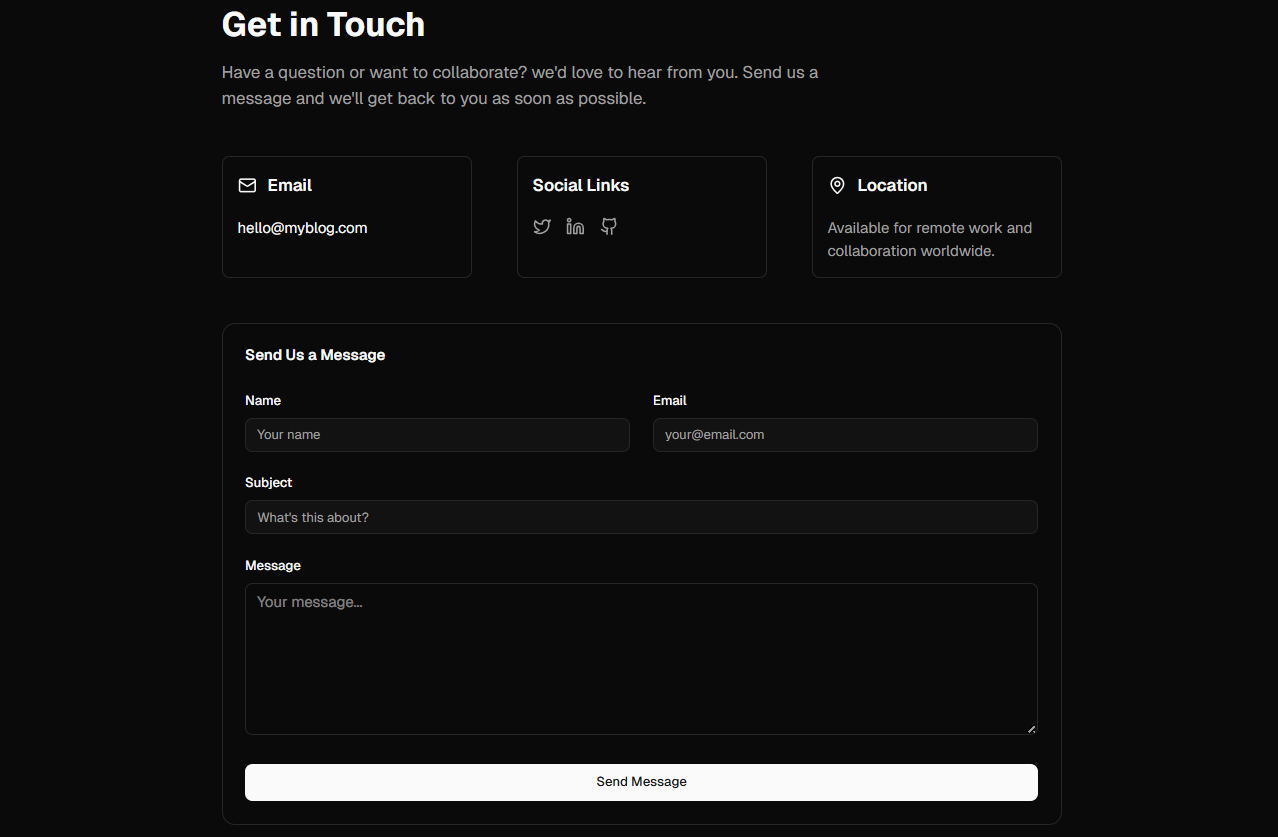
ContactPage.tsx
Next.js•Tailwind CSS
1"use client";
2
3import type React from "react";
4
5import { useState } from "react";
6import { Button } from "@/components/ui/button";
7import { Input } from "@/components/ui/input";
8import { Card, CardContent, CardHeader, CardTitle } from "@/components/ui/card";
9import { Mail, Twitter, MapPin, Linkedin, Github } from "lucide-react";
10
11export default function ContactPage() {
12  const [formData, setFormData] = useState({
13    name: "",
14    email: "",
15    subject: "",
16    message: "",
17  });
18  const [submitted, setSubmitted] = useState(false);
19
20  const handleChange = (
21    e: React.ChangeEvent<HTMLInputElement | HTMLTextAreaElement>
22  ) => {
23    setFormData({ ...formData, [e.target.name]: e.target.value });
24  };
25
26  const handleSubmit = (e: React.FormEvent) => {
27    e.preventDefault();
28    // In a real app, you would send this to an email service or backend
29    console.log("Form submitted:", formData);
30    setSubmitted(true);
31    setFormData({ name: "", email: "", subject: "", message: "" });
32    setTimeout(() => setSubmitted(false), 3000);
33  };
34
35  return (
36    <div className="flex flex-col">
37      <main className="flex-1 max-w-4xl mx-auto px-4 sm:px-6 lg:px-0 py-12 w-full">
38        <h1 className="text-4xl font-bold mb-4 text-balance">Get in Touch</h1>
39        <p className="text-lg text-muted-foreground mb-12 max-w-2xl">
40          Have a question or want to collaborate? we'd love to hear from you.
41          Send us a message and we'll get back to you as soon as possible.
42        </p>
43
44        <div className="grid gap-12 md:grid-cols-3 mb-12">
45          {/* Email */}
46          <div className="flex flex-col gap-3 border border-border p-4 rounded-md">
47            <div className="flex items-center gap-3 mb-2">
48              <Mail className="w-5 h-5 text-primary" />
49              <h3 className="font-semibold text-lg">Email</h3>
50            </div>
51            <a
52              href="mailto:hello@myblog.com"
53              className="text-primary hover:underline"
54            >
55              hello@myblog.com
56            </a>
57          </div>
58
59          {/* Social Media */}
60          <div className="flex flex-col gap-3 border border-border p-4 rounded-md">
61            <div className="flex items-center gap-3 mb-2">
62              <h3 className="font-semibold text-lg">Social Links</h3>
63            </div>
64            <div className="flex gap-4">
65              <a
66                href="https://twitter.com"
67                target="_blank"
68                rel="noopener noreferrer"
69                aria-label="Twitter"
70                className="text-muted-foreground hover:text-primary transition"
71              >
72                <Twitter className="w-5 h-5" />
73              </a>
74              <a
75                href="https://linkedin.com"
76                target="_blank"
77                rel="noopener noreferrer"
78                aria-label="LinkedIn"
79                className="text-muted-foreground hover:text-primary transition"
80              >
81                <Linkedin className="w-5 h-5" />
82              </a>
83              <a
84                href="https://github.com"
85                target="_blank"
86                rel="noopener noreferrer"
87                aria-label="GitHub"
88                className="text-muted-foreground hover:text-primary transition"
89              >
90                <Github className="w-5 h-5" />
91              </a>
92            </div>
93          </div>
94
95          {/* Location */}
96          <div className="flex flex-col gap-3 border border-border p-4 rounded-md">
97            <div className="flex items-center gap-3 mb-2">
98              <MapPin className="w-5 h-5 text-primary" />
99              <h3 className="font-semibold text-lg">Location</h3>
100            </div>
101            <p className="text-muted-foreground">
102              Available for remote work and collaboration worldwide.
103            </p>
104          </div>
105        </div>
106
107        {/* Contact Form */}
108        <Card>
109          <CardHeader>
110            <CardTitle>Send Us a Message</CardTitle>
111          </CardHeader>
112          <CardContent>
113            <form onSubmit={handleSubmit} className="space-y-6">
114              <div className="grid gap-6 md:grid-cols-2">
115                <div>
116                  <label className="text-sm font-medium text-foreground block mb-2">
117                    Name
118                  </label>
119                  <Input
120                    type="text"
121                    name="name"
122                    value={formData.name}
123                    onChange={handleChange}
124                    placeholder="Your name"
125                    required
126                  />
127                </div>
128                <div>
129                  <label className="text-sm font-medium text-foreground block mb-2">
130                    Email
131                  </label>
132                  <Input
133                    type="email"
134                    name="email"
135                    value={formData.email}
136                    onChange={handleChange}
137                    placeholder="your@email.com"
138                    required
139                  />
140                </div>
141              </div>
142
143              <div>
144                <label className="text-sm font-medium text-foreground block mb-2">
145                  Subject
146                </label>
147                <Input
148                  type="text"
149                  name="subject"
150                  value={formData.subject}
151                  onChange={handleChange}
152                  placeholder="What's this about?"
153                  required
154                />
155              </div>
156
157              <div>
158                <label className="text-sm font-medium text-foreground block mb-2">
159                  Message
160                </label>
161                <textarea
162                  name="message"
163                  value={formData.message}
164                  onChange={handleChange}
165                  placeholder="Your message..."
166                  rows={6}
167                  required
168                  className="w-full px-3 py-2 border border-border rounded-md bg-background text-foreground focus:outline-none focus:ring-2 focus:ring-primary"
169                />
170              </div>
171
172              <Button type="submit" size="lg" className="w-full">
173                Send Message
174              </Button>
175
176              {submitted && (
177                <div className="p-4 bg-green-500/10 border border-green-500/20 rounded-md text-green-700 dark:text-green-400">
178                  ✓ Message sent successfully! I'll get back to you soon.
179                </div>
180              )}
181            </form>
182          </CardContent>
183        </Card>
184      </main>
185    </div>
186  );
187}