
Component Details
Filterable Component 02
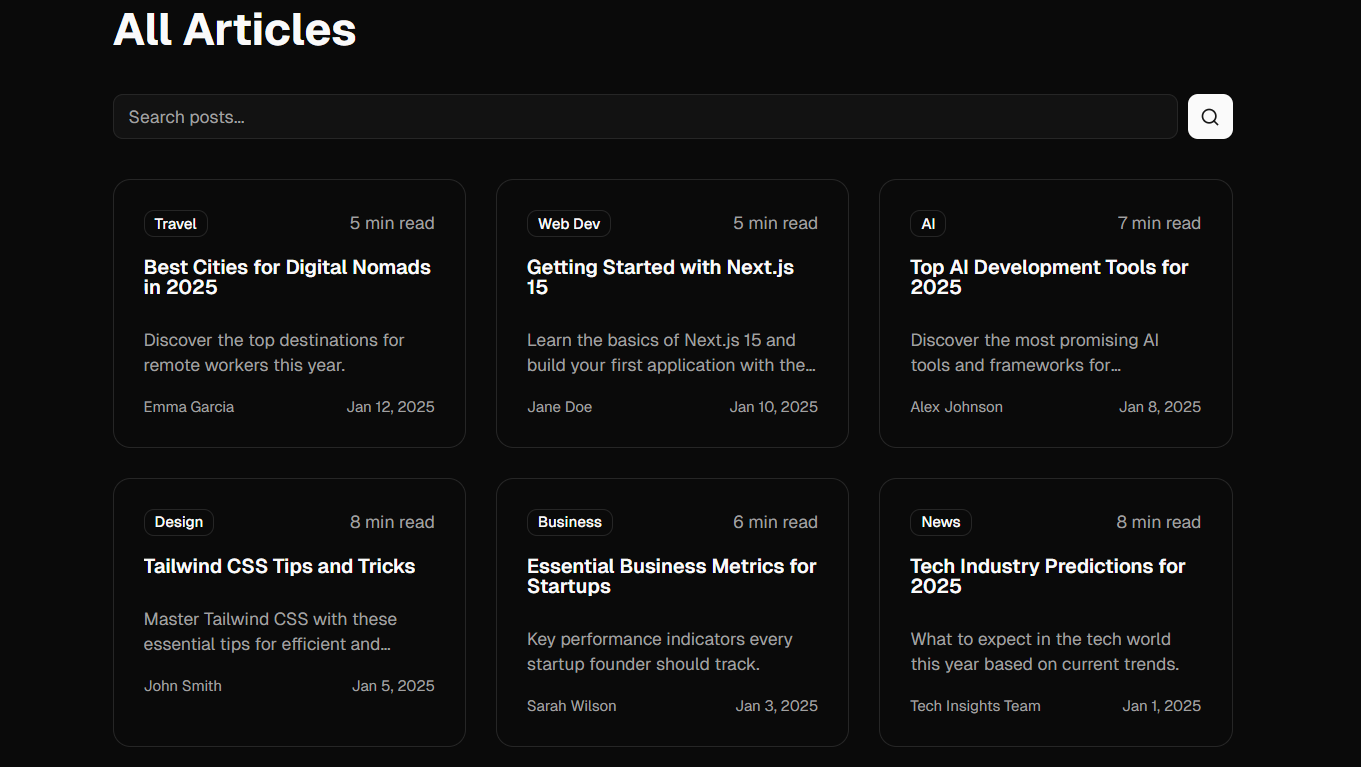
PostCard.tsx
Next.js•Tailwind CSS
1"use client";
2
3import { useState, useCallback } from "react";
4import Link from "next/link";
5import { Card, CardContent, CardHeader, CardTitle } from "@/components/ui/card";
6import { Badge } from "@/components/ui/badge";
7import { Input } from "@/components/ui/input";
8import { Button } from "@/components/ui/button";
9import { Search } from "lucide-react";
10
11// Dummy data for blog posts
12const dummyPosts = [
13  {
14    id: 1,
15    slug: "getting-started-with-nextjs",
16    title: "Getting Started with Next.js 14",
17    excerpt: "Learn how to build modern web applications with Next.js 14 and its new features including Server Actions and partial prerendering.",
18    category: "Web Development",
19    author: "Jane Doe",
20    date: "2024-01-15",
21    readTime: 5,
22    content: "Next.js 14 introduces several new features that make building web applications faster and more efficient..."
23  },
24  {
25    id: 2,
26    slug: "tailwind-css-best-practices",
27    title: "Tailwind CSS Best Practices for 2024",
28    excerpt: "Discover the most effective ways to use Tailwind CSS in your projects, from component architecture to performance optimization.",
29    category: "CSS",
30    author: "John Smith",
31    date: "2024-01-10",
32    readTime: 8,
33    content: "Tailwind CSS has become the go-to utility-first CSS framework for many developers..."
34  },
35  {
36    id: 3,
37    slug: "react-performance-tips",
38    title: "Advanced React Performance Optimization",
39    excerpt: "Explore techniques to improve your React application performance including memoization, code splitting, and virtualization.",
40    category: "React",
41    author: "Alex Johnson",
42    date: "2024-01-05",
43    readTime: 10,
44    content: "React applications can suffer from performance issues as they grow in complexity..."
45  },
46  {
47    id: 4,
48    slug: "typescript-advanced-patterns",
49    title: "Advanced TypeScript Patterns for React",
50    excerpt: "Master advanced TypeScript patterns to build type-safe React applications with better developer experience.",
51    category: "TypeScript",
52    author: "Sarah Wilson",
53    date: "2023-12-20",
54    readTime: 12,
55    content: "TypeScript and React are a powerful combination for building robust applications..."
56  },
57  {
58    id: 5,
59    slug: "api-design-best-practices",
60    title: "Modern API Design Best Practices",
61    excerpt: "Learn how to design RESTful and GraphQL APIs that are scalable, maintainable, and developer-friendly.",
62    category: "Backend",
63    author: "Michael Chen",
64    date: "2023-12-10",
65    readTime: 7,
66    content: "API design is crucial for the success of any modern application..."
67  },
68  {
69    id: 6,
70    slug: "docker-for-frontend-developers",
71    title: "Docker for Frontend Developers",
72    excerpt: "A practical guide to using Docker in frontend development workflows for consistent environments.",
73    category: "DevOps",
74    author: "Emily Rodriguez",
75    date: "2023-11-28",
76    readTime: 9,
77    content: "Docker is not just for backend services and operations teams..."
78  }
79];
80
81// SearchBar Component
82interface SearchBarProps {
83  onSearch: (query: string) => void;
84}
85
86function SearchBar({ onSearch }: SearchBarProps) {
87  const [query, setQuery] = useState("");
88
89  const handleSubmit = (e: React.FormEvent) => {
90    e.preventDefault();
91    onSearch(query);
92  };
93
94  return (
95    <form onSubmit={handleSubmit} className="relative">
96      <div className="relative">
97        <Search className="absolute left-3 top-1/2 transform -translate-y-1/2 text-muted-foreground h-4 w-4" />
98        <Input
99          type="text"
100          placeholder="Search articles..."
101          value={query}
102          onChange={(e) => {
103            setQuery(e.target.value);
104            if (!e.target.value.trim()) {
105              onSearch("");
106            }
107          }}
108          className="pl-10 pr-4 py-2 w-full"
109        />
110      </div>
111    </form>
112  );
113}
114
115// PostCard Component
116interface PostCardProps {
117  slug: string;
118  title: string;
119  excerpt: string;
120  category: string;
121  author: string;
122  date: string;
123  readTime: number;
124}
125
126export function PostCard({
127  slug,
128  title,
129  excerpt,
130  category,
131  author,
132  date,
133  readTime,
134}: PostCardProps) {
135  function formatDate(dateString: string) {
136    const date = new Date(dateString);
137    const months = [
138      "Jan",
139      "Feb",
140      "Mar",
141      "Apr",
142      "May",
143      "Jun",
144      "Jul",
145      "Aug",
146      "Sep",
147      "Oct",
148      "Nov",
149      "Dec",
150    ];
151    return `${
152      months[date.getMonth()]
153    } ${date.getDate()}, ${date.getFullYear()}`;
154  }
155
156  return (
157    <Link href={`/blog/${slug}`}>
158      <Card className="hover:shadow-lg transition h-full">
159        <CardHeader>
160          <div className="flex items-start justify-between gap-2 mb-2">
161            <Badge variant="outline">{category}</Badge>
162            <span className="text-sm text-muted-foreground">
163              {readTime} min read
164            </span>
165          </div>
166          <CardTitle className="line-clamp-2">{title}</CardTitle>
167        </CardHeader>
168        <CardContent>
169          <p className="text-sm text-muted-foreground mb-4 line-clamp-2">
170            {excerpt}
171          </p>
172          <div className="flex justify-between items-center text-xs text-muted-foreground">
173            <span>{author}</span>
174            <span>{formatDate(date)}</span>
175          </div>
176        </CardContent>
177      </Card>
178    </Link>
179  );
180}
181
182// Main BlogPage Component
183export default function BlogPage() {
184  const [searchResults, setSearchResults] = useState<typeof dummyPosts | null>(null);
185  const allPosts = dummyPosts.sort(
186    (a, b) => new Date(b.date).getTime() - new Date(a.date).getTime()
187  );
188  const posts = searchResults !== null ? searchResults : allPosts;
189
190  const handleSearch = useCallback(
191    (query: string) => {
192      if (!query.trim()) {
193        setSearchResults(null);
194        return;
195      }
196
197      const results = allPosts.filter((post) => {
198        const lowerQuery = query.toLowerCase();
199        return (
200          post.title.toLowerCase().includes(lowerQuery) ||
201          post.excerpt.toLowerCase().includes(lowerQuery) ||
202          post.content.toLowerCase().includes(lowerQuery)
203        );
204      });
205      setSearchResults(results);
206    },
207    [allPosts]
208  );
209
210  return (
211    <div className="flex flex-col">
212      <main className="flex-1 max-w-4xl mx-auto px-4 sm:px-6 lg:px-0 py-12 w-full">
213        <h1 className="text-4xl font-bold mb-8">All Articles</h1>
214
215        <div className="mb-8">
216          <SearchBar onSearch={handleSearch} />
217        </div>
218
219        {posts.length === 0 ? (
220          <div className="text-center py-12">
221            <p className="text-muted-foreground text-lg">No articles found. Try a different search term.</p>
222          </div>
223        ) : (
224          <div className="grid gap-6 md:grid-cols-2 lg:grid-cols-3">
225            {posts.map((post) => (
226              <PostCard
227                key={post.id}
228                slug={post.slug}
229                title={post.title}
230                excerpt={post.excerpt}
231                category={post.category}
232                author={post.author}
233                date={post.date}
234                readTime={post.readTime}
235              />
236            ))}
237          </div>
238        )}
239      </main>
240    </div>
241  );
242}